Booking software for studios and gyms.

Clients book and pay from their phone, on a page in your name and colours. You run the timetable, check-in, passes, memberships and payments from one console.

A morning class in a bright, open studio
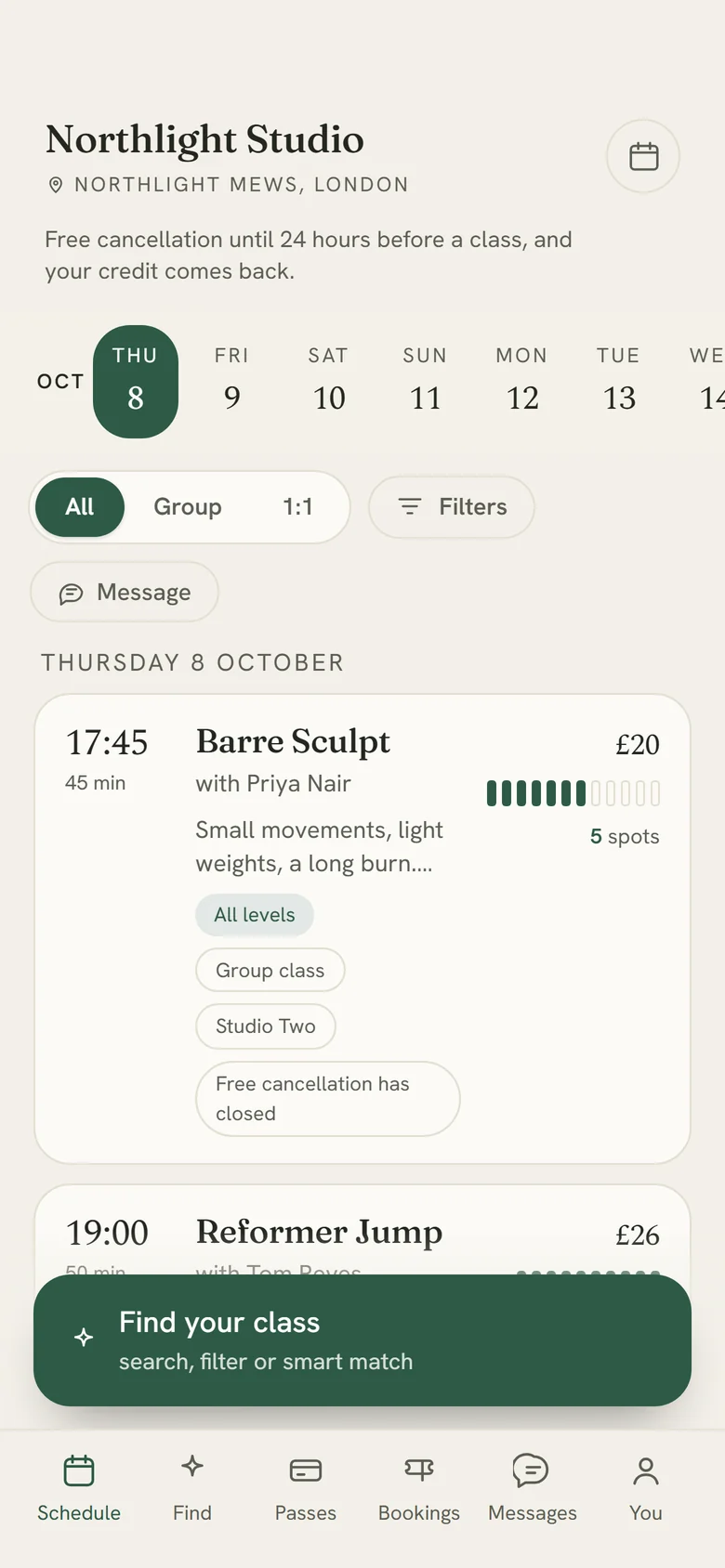
A studio's booking page on a phone: the week's dates, then each class with its time, teacher, price and spaces left

We move your clients, passes and future bookings from Gymcatch, Mindbody, Momence or a spreadsheet. How the move works

First month free From £15.99 a month No charge per booking

One system for bookings, passes, payments and the front desk.

Classes, privates, duets and courses on one timetable. Packs, memberships, waitlists, health forms, messages and card payments in the same place.
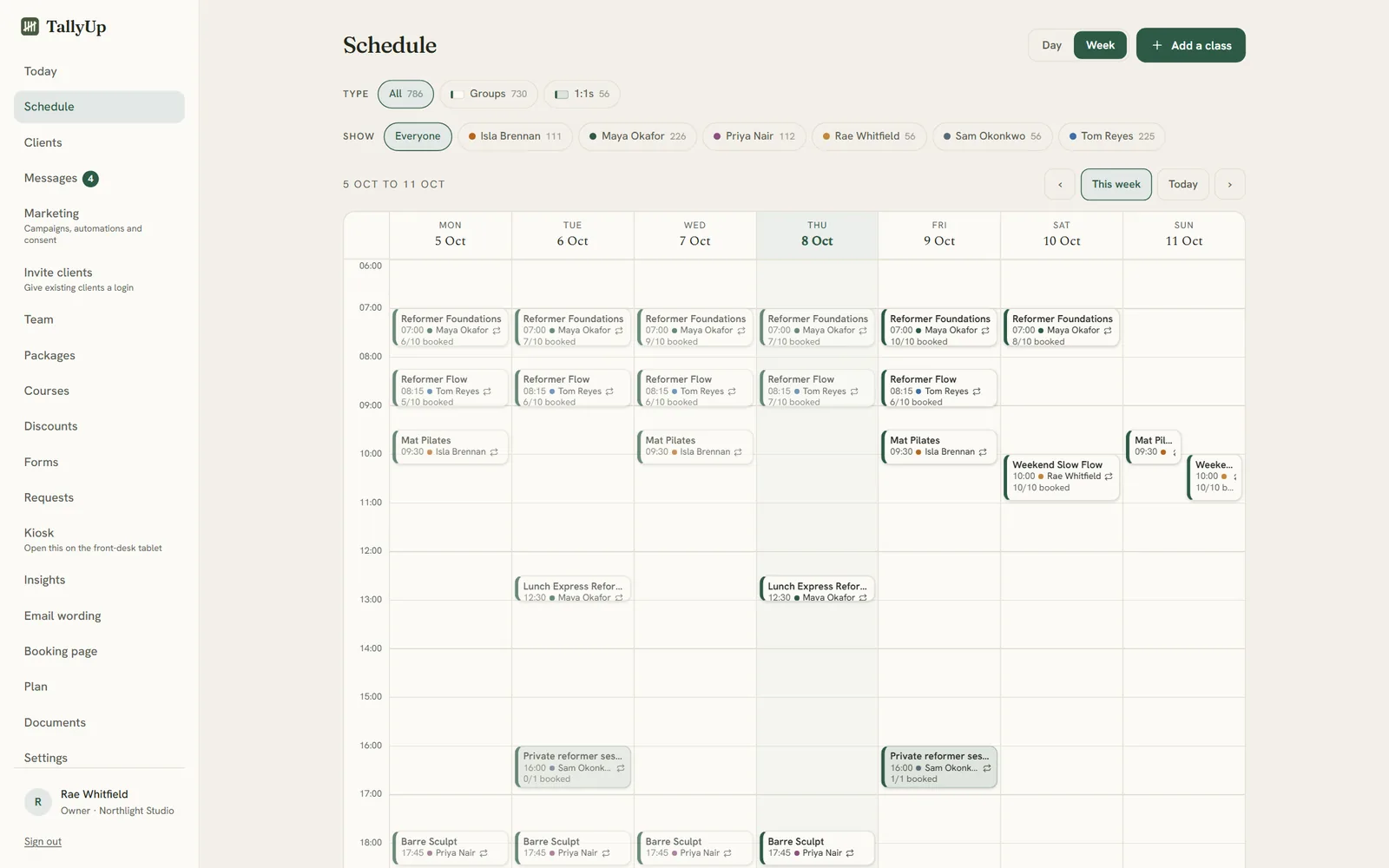
The schedule for the week: reformer, mat and private classes Monday to Sunday, each with its teacher in their own colour and how many are booked
The studio's booking page as an app on a phone: the studio's name, the week to pick from, and the day's classes with time, teacher, price and spots left, with Schedule, Find, Passes, Bookings, Messages and You along the bottom
A class list: who is booked, a birthday, a note from a health form, a payment still due, and present or no-show buttons for each person
Booked in under thirty secondsOn their phone, with no account needed, in your name and your colours.
Checked in with one tapWith how each person paid on the same line: a pass, a card, a membership or still owing.
See what each class earnsHow full each class is, no-shows, what each hour earns, and who has stopped coming.
Made forPilatesReformerYogaBarreDanceStrengthPersonal training

Inside the console.

The console covers the timetable, front desk, clients, passes, forms, messages and reports. Pick a section to see its screens.

Timetable

See today at a glance, then plan the weeks ahead on one grid. Repeating classes, one-offs, privates and courses, each teacher in their own colour, and every class showing how full it is.

Screens from the TallyUp console, shown with an example studio.

The Today page: the next class, the studio's booking link, classes today, how many are booked in, spots free and revenue, with each class and its roster link The schedule for the week: reformer, mat and private classes Monday to Sunday, each with its teacher in their own colour and how many are booked A class list: who is booked, a birthday, a note from a health form, a payment still due, and present or no-show buttons for each person The check-in screen for a tablet by the door: today's classes across the top, and each person taps their name to check in Requests from clients who could not find a time that suits, each with a button to send a payment link for a custom session The client list: everyone on the books, with status, classes, no-shows, spend and when they were last seen, and filters for who has gone quiet One client's record: contact details, birthday, emergency contact, how they like to be contacted, attendance, lifetime spend and a membership A client's membership and what it was used for, with her upcoming bookings and recent history side by side The invite page: how many clients can sign in, how many have been invited, who is still to invite, and a button to send the next batch Packages and pricing: a single class, a private session, an intro offer, class packs, a monthly unlimited membership and a gift card Courses: a six week beginners course and a four week strength block, each with its price, start date and how many are enrolled Discount codes: a percentage code, a fixed amount code, a birthday code and a seasonal code, with how many times each was used and who used it Forms: the health and studio agreement clients fill in before they can book, a photos and social media form, and a draft class feedback form The form builder: a section heading and yes or no questions that can flag an answer for the teacher and ask for details Messages from clients: new ones marked, with the first line of each and the time it arrived Marketing: how many clients are happy to hear from you, who has never been asked, and how recent campaigns did Email wording: the colour, logo position, button shape and font of every email, with a live preview of the email a new client receives Insights: revenue, average fill, no-show rate and active clients, then the operating numbers and attendance, each compared with the period before Every class ranked by what it earns and how hard each hour of studio time works, with revenue by class and by teacher Whether clients are coming back, and a list of regulars who have gone quiet with how long since their last class The booking page settings: the studio's own link, and the button that puts booking on the studio's own website, with a live preview The studio's booking page: a calendar, the day's classes with teacher, price and spots left, and the cancellation terms The team page: who can sign in to run the studio, and the teachers with their calendars, profiles and what each teaches The documents page: the signed agreement with TallyUp, the terms, the data processing agreement, the privacy notice and the sub-processors

Every plan also includes your cancellation terms on every class, written from your own settings; calendar feeds for you and your clients; a widget for your own website; exports of your bookings and clients, with no lock-in; and team logins with roles.

An AI concierge that finds each client the right class.

A client describes what they want in a sentence. The concierge returns up to four of your classes, ranked, each with a short reason it fits. It works from your own class descriptions and only suggests classes that can be booked. Included in Studio + Concierge at £19.99 a month.

Set up in an afternoon.

Name your studioYour account and booking page exist straight away, on your own link.
Add your timetableClasses, times and prices, repeating each week, with sensible defaults to start from.
Share your linkBehind the Book button on your website, in your bio and on your posters.
Take bookingsThey land in your console as they happen, and confirmations go out on their own.

If you booked a class with a studio on TallyUp, sign in to see your bookings or open the link your studio sent you.

We move your studio across for you.

Nothing reaches your clients until you say so. Then everybody is sent their login link in a few clicks, and their passes and bookings are already there when they first sign in.

  • Your client list, with how each person likes to be contacted
  • The passes and credits each client still holds
  • Classes already booked for the weeks ahead

We move studios from Gymcatch, Mindbody, Momence or a spreadsheet. You send us an export and we help with the rest.

What every studio gets.

  • Your first month is freeNothing is charged during it, you can cancel any time from your console, and there is no minimum term.
  • Changes at no extra costTell us what is missing or what should look different. We read every request in our weekly review, and what we build costs you nothing extra.
  • We do the moveWe move your clients, their passes and their future bookings from Gymcatch, Mindbody, Momence or a spreadsheet. Nothing reaches your clients until you say so.
  • Your data is yoursExport your bookings and client list whenever you like. No lock-in and no exit fee.
  • Nothing added for your clientsOne flat monthly fee per studio, no charge per booking. Card payments are 2% + 20p for UK cards, taken from the payment itself.
  • You talk to the people who build itMessages go straight to the team that builds TallyUp.

£15.99 or £19.99 a month per studio.

Per studio, with everything included and unlimited bookings. Your first month is free, for every studio, and there is no minimum term.

Studio
£15.99a month

Your booking page and the console, with unlimited bookings, packs and memberships, waitlists, forms, messages and payments.

Start with Studio →
Studio + Concierge
£19.99a month

Everything in Studio, plus the AI concierge that matches each client to the right class when they say what they are after.

Start with Concierge →

Your first month is free.

Every studio starts with a free month, and the offer has no end date. Nothing is charged during it, and you see the date of your first payment before you add a card.

Give a month, get a month

Refer a studio and you both get a free month.

Every studio has its own link on its Plan page. A studio that joins through yours gets its second month free as well as its first. Once they have paid their first bill, a month comes off yours. Send it to as many studios as you like.

Card payments go straight to your bank through Stripe, with a standard card processing fee of 2% + 20p for UK cards, made up of Stripe’s fee and a 0.5% TallyUp processing fee. Nothing is added to what your clients pay. Full pricing

Ask for a feature or a design change.

We review every request each week and tell you what we decide. Anything we build for you costs nothing extra.

Tell us what you need →

Try TallyUp free for your first month.